Settings
Both settings live in the same gear-icon menu in the header, available on every page.
Interface language
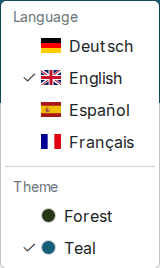
This picks the language of the OnRouteMap website itself: menus, buttons, and so on. Available languages are listed with a flag icon and a checkmark next to the one currently active; picking one reloads the current page in that language.
Note
This is separate from the map language dropdown on the map-creation form, which only affects labels baked into a generated map.
Color theme
You can also pick a color theme for the site's interface, "Teal" by default, or "Forest", each shown with a small color swatch, whichever suits your taste. This just changes button and accent colors on the site; it doesn't touch the map's tile style, and there's no separate dark-mode toggle.